Description
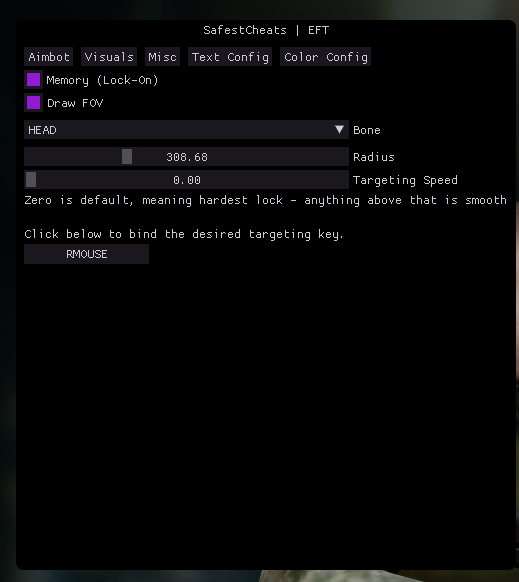
Aimbot Tab
- Memory (Lock-On): Toggle checkbox to enable memory-based aiming lock.
- Draw FOV: Toggle checkbox to visually display the target field of view boundary.
- Bone Selection: Dropdown menu to choose the target bone location.
- Radius Slider: Adjustable configuration value for the aimbot radius.
- Targeting Speed Slider: Adjustable slider to configure smoothing.
- Targeting Keybind: Interactive key assignment button to select the activation key.
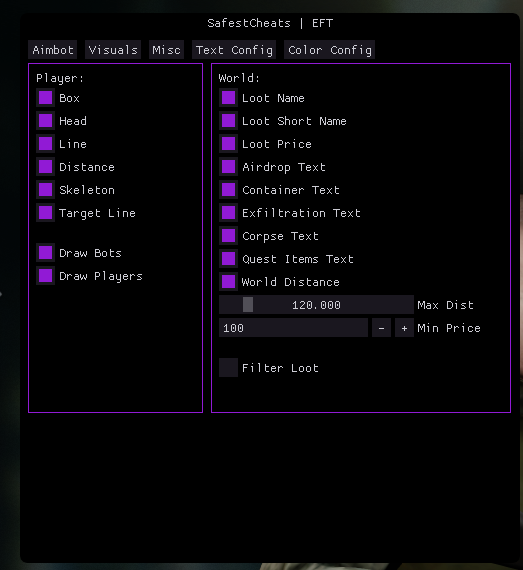
Visuals Tab
Player sub-section:
- Box: Toggle checkbox to draw bounding boxes around players.
- Head: Toggle checkbox to highlight player heads.
- Line: Toggle checkbox to draw snap-lines to players.
- Distance: Toggle checkbox to display text indicators showing how far away players are.
- Skeleton: Toggle checkbox to render structural skeleton overlays on player models.
- Target Line: Toggle checkbox to draw lines directly toward designated targets.
- Draw Bots: Toggle checkbox to display visual elements for AI/bot entities.
- Draw Players: Toggle checkbox to display visual elements for active human players.
World sub-section:
- Loot Name: Displays full names of items in the game world.
- Loot Short Name: Displays abbreviated item names.
- Loot Price: Shows calculated currency values alongside item listings.
- Airdrop Text: Displays text labels identifying airdrop locations.
- Container Text: Displays text labels identifying searchable storage containers.
- Exfiltration Text: Displays text labels identifying extraction points.
- Corpse Text: Displays text labels identifying dead bodies.
- Quest Items Text: Displays text labels pointing out active mission items.
- World Distance: Toggle checkbox to show distance values for world items.
- Max Dist Slider: Restricts ESP rendering up to an adjustable maximum range constraint (currently set to 120.000).
- Min Price Input: Filters out item rendering below a specified item price threshold (currently numeric text entry set to 100).
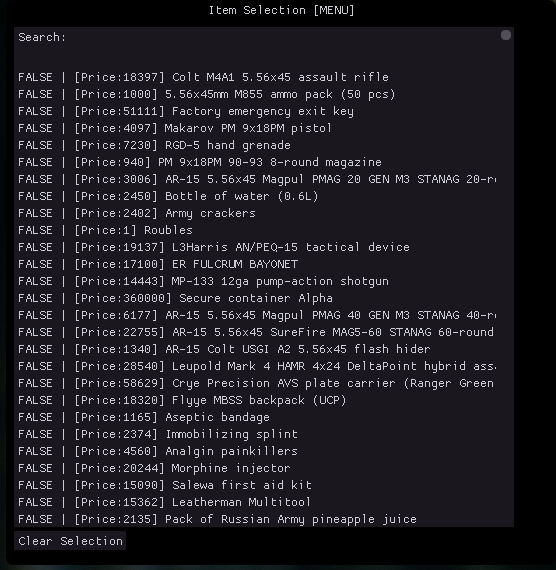
- Filter Loot Checkbox: Opens a dedicated sub-menu window labeled Item Selection [MENU] containing a searchable list of item objects (e.g., Colt M4A1, Factory emergency exit key, Roubles, Secure container Alpha, etc.) to toggle individual visibility values (
TRUE/FALSE) alongside a Clear Selection tool button.
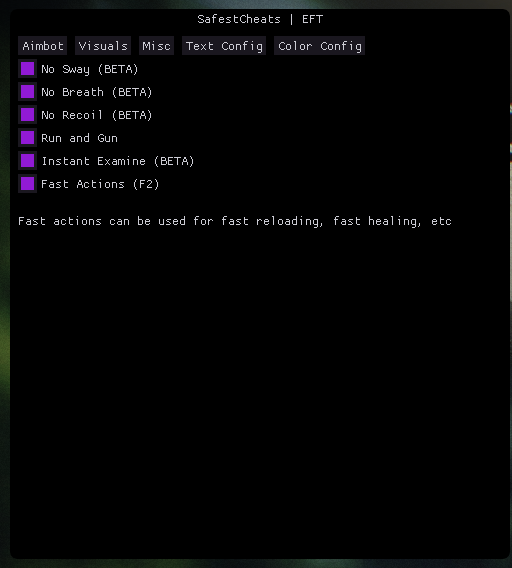
Misc Tab
- No Sway (BETA): Toggle checkbox to eliminate weapon sway motion.
- No Breath (BETA): Toggle checkbox to bypass standard operational breathing patterns/steadiness mechanics.
- No Recoil (BETA): Toggle checkbox to strip away automatic firearm kickback vectors.
- Run and Gun: Toggle checkbox to allow standard firing speeds/actions while sprinting.
- Instant Examine (BETA): Toggle checkbox to discover and identify unknown item criteria instantly without wait timers.
- Fast Actions (F2): Toggle checkbox to instantly fast-track in-game mechanical wait bars, summarized by the text: “Fast actions can be used for fast reloading, fast healing, etc”.
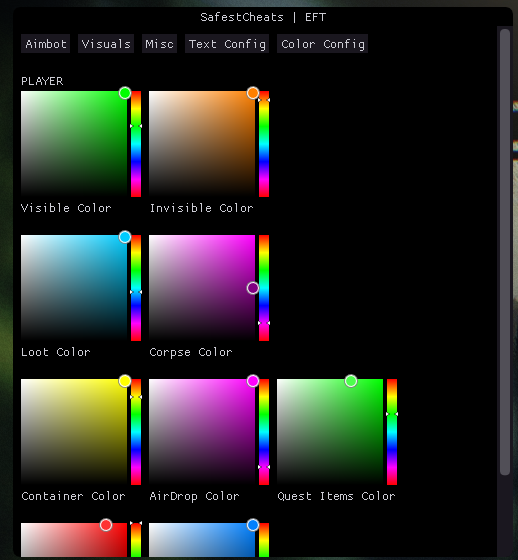
Color Config Tab
Features granular gradient panels with interactive side-sliders to dynamically select target color spectrum settings across distinct UI indicators:
- Visible Color
- Invisible Color
- Loot Color
- Corpse Color
- Container Color
- AirDrop Color
- Quest Items Color
![Arena Breakout [ABI]](https://safestcheats.com/wp-content/uploads/2026/06/SC-ABI-Box-300x300.png)